




If you’ve paid attention to the photography and video shooting industry over the past decade, you know that the demand for video content is higher than ever before. Much of that demand comes from popular content creators who have raised their bars primarily in production quality. From Tiktoks and Instagram reels to YouTube tutorials and product demos, creators and brands are often under pressure to quickly create professional quality content without the luxury of large budgets or production teams. Enter an AI-powered video editing tool, a platform to rebuild how creators plan, edit and publish content.
In 2025, AI tools are no longer “good to have.” They have become essential to streamline workflows, improve quality, and help you stand out in your busy feed. Below we explore some of the most notable AI video editing tools available today, and share notes about what makes them unique, with the aim of finding the best one for your workflow.
Jump to section
vmake.ai: A versatile all-rounder
Who is it for?
Kick off with the One-Stop Shop “All-Round” option. While some AI video tools are great for one specific task, vmake.ai takes a more versatile approach by combining multiple features, making it ideal for creators and businesses who need an all-in-one solution. Additionally, vmake.ai can be accessed through a web browser on both desktop and mobile devices, providing flexibility for creators on the go.
What it does
As an all-in-one solution, vmake.ai does a lot. For starters, the platform’s AI video background remover allows users to isolate subjects without the need for chroma key setup or complex masking. So, it produces clean results immediately (in fact, in seconds). Unlike some simple tools, vmake.ai also allows creators to have custom backgrounds using solid colors, brand visuals, or transparent layers to make content more flexible.
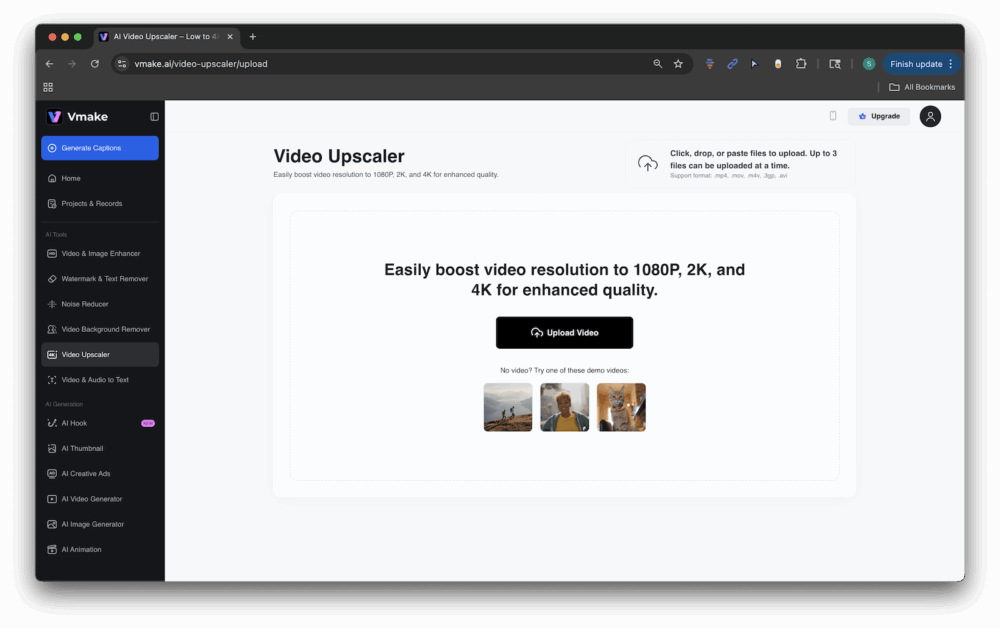
The vmake.ai video Upscaler goes beyond background removal to sharp focus on low-resolution footage, upscaling 480p or 720p clips to sharp 2k or 4K output, while enhancing color, reducing noise and maintaining a manageable file size.
Batch processing is another outstanding feature, allowing creators to edit multiple clips at the same time. This is perfect for teams juggling large numbers of projects.
What really sets vmake.ai apart is its balance of ease of use and depth. It’s intuitive for beginners with one-click automation for core tasks, but powerful enough to meet the needs of marketers, educators and professionals who produce commercial content. Social Media Editor can be used for sophisticated reels, e-commerce businesses for product demos without distractions, and for presenters of impactful webinars. Like we said, it’s all-around.
Important features
Single-click background isolation: Automatic detection and separation of subjects. Multi-format support: Compatible with formats such as .mp4, .mov, .m4v, .avi, .3gp. Batch Processing: Process up to three videos simultaneously per user. Accurate detection: Unique algorithms maintain clean edges with accurate subject tracking. Custom Background: Add a transparent layer, solid, green screen, or custom visual.
Pricing
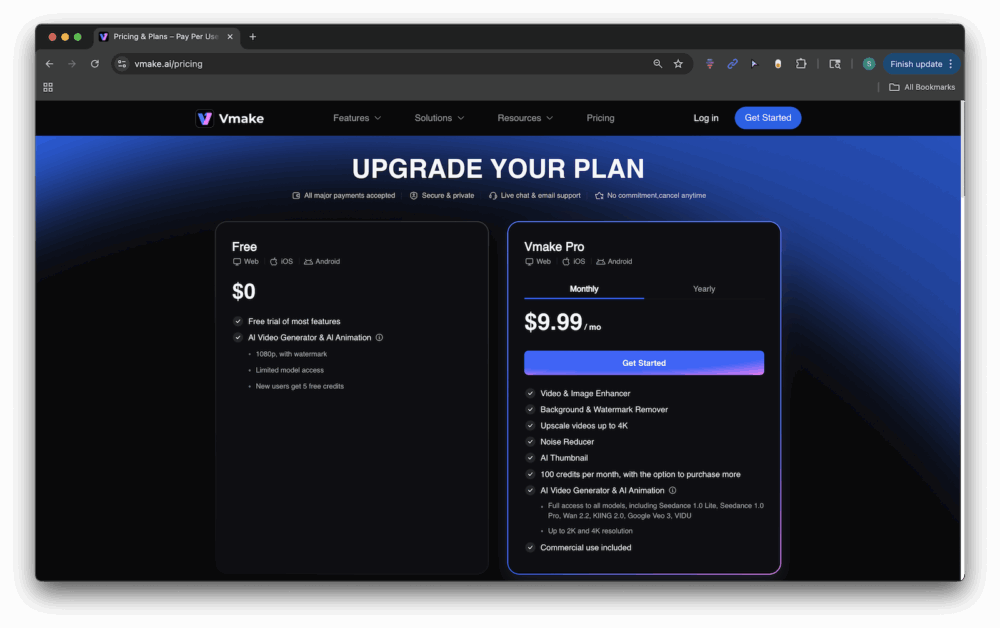
vmake.ai offers free trials that allow you to access tools such as AI video generators and AI animations. For $9.99 a month or $69.99 a year, upgrade to Vmake Pro and access all vmake.ai tools, including image video enhancers, background and watermark removers, noise readers and more. According to their site, “Vmake Pro members will receive a free usage quota of 30 features within 24 hours for all features such as Video & Image Enhancer, Noise Reduction, Video Background Remover, Video Watermark Remover, and more. You can use credits beyond this quota.”
Canva Pro: Design meets video editing

Who is it for?
For creators who already use Canva for their graphics, Canva Pro’s AI-powered video editing suite is a natural extension. Additionally, marketers and small businesses appreciate Canva Pro’s all-in-one approach. Video shines in a scenario where video is just one of the broader visual workflows.
What it does
Like vmake.ai, Canva’s “Pro” option strives to be an all-in-one solution. The platform integrates background removal, motion graphics and templates into one streamlined workspace. The biggest advantage is accessibility. Edit everything, including social posts, presentations, short form videos, and more, without switching tools.

Canva’s background remover and brush-based improvements allow for the separation of subjects in just a few clicks, but its large-scale template library allows for seamless layering of text, graphics and animation.
Important features
One-click background remover for drag and drop templates for both image and video clips for social media, presentations, ads integration animation, text and graphics.
Pricing
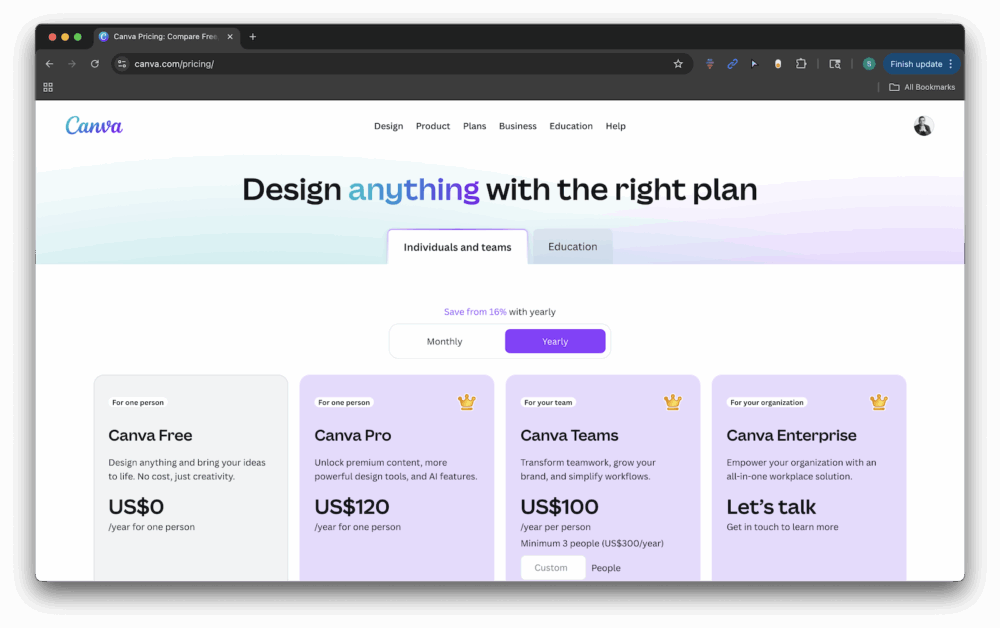
Canva offers a variety of plans to meet the needs of different users. Usage limits and AI-powered design tools vary by plan.
Unclasses: Simplicity of background deletion
Who is it for?
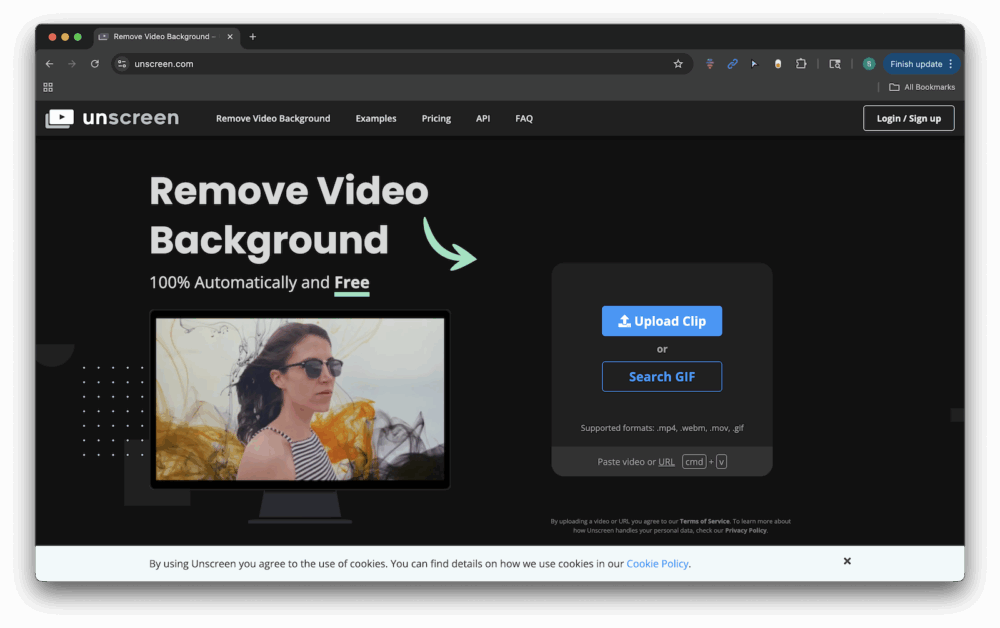
For quick and clean background deletion, Unscreen offers a no-frills web-based solution. Unscreen supports popular formats such as .MP4, .MOV, .GIF, and more, which is useful for GIF creators, meme makers, and social media editors who need videos without backgrounds quickly. Although it is limited compared to the complete editing suite, its strength lies in its simplicity. It’s a tool to do one thing well and do it right away.
What it does
By uploading clips, AI automatically detects and removes backgrounds without the need for green screen, manual masking, or editing expertise. Instead, all you need to do is simply upload your footage and let the AI handle the rest. Although it does not offer advanced customization or editing tools, it is excellent at creating clean subject crops in seconds. Unscreen is particularly popular with Meme Creators, Tiktok editors, and marketers who need distractions.
Important features
100% automatic subject separation, no manual masking is required.
Pricing
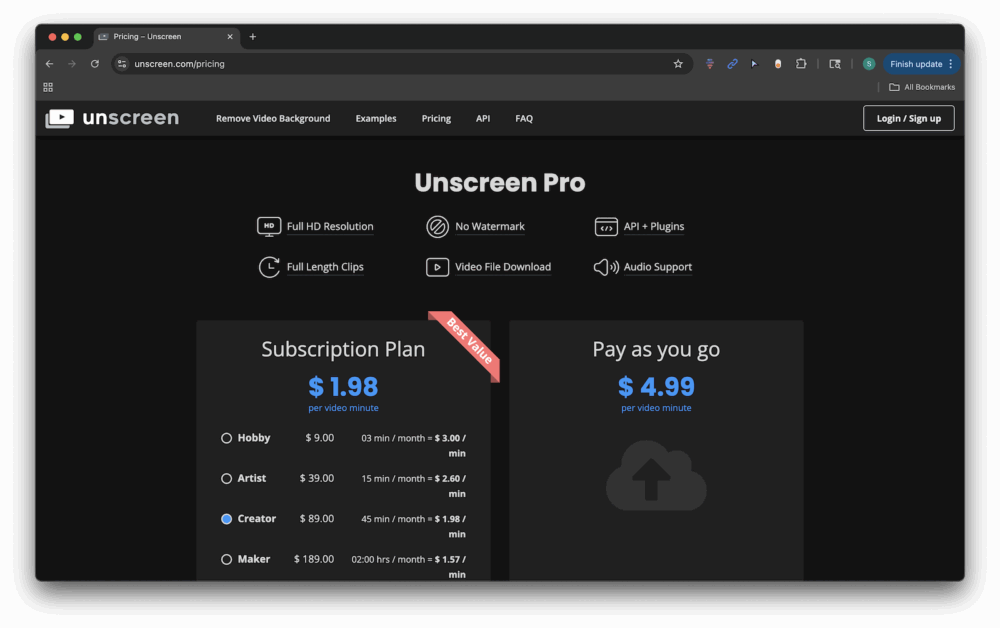
In addition to the minimal free options, Unscreen offers a variety of pricing plans based on time usage and specific features.
cutout.pro: background remover and enhancement

Who is it for?
For creators working with older or lower resolution footage, cutout.pro is a reliable option for upscaling. It can increase resolutions from 240p or 480p to 2k resolutions, while reducing noise, stabilizing unstable images, and smoothing motion artifacts. This makes it especially valuable for filmmakers to restore influencers who restore archived content and reuse mobile shot clips for YouTube. Its automation and browser-based accessibility make it ideal for those who don’t want to wrestletter with advanced editing software but need professional grade results.
What it does
cutout.pro’s video toolkit focuses on some core features of AI image-to-video generation, automatic video background removal, and AI video extensions. Image-to-Video tools allow you to animate a single photo into a short clip or generate videos from a text prompt, an image, or a rough storyboard.
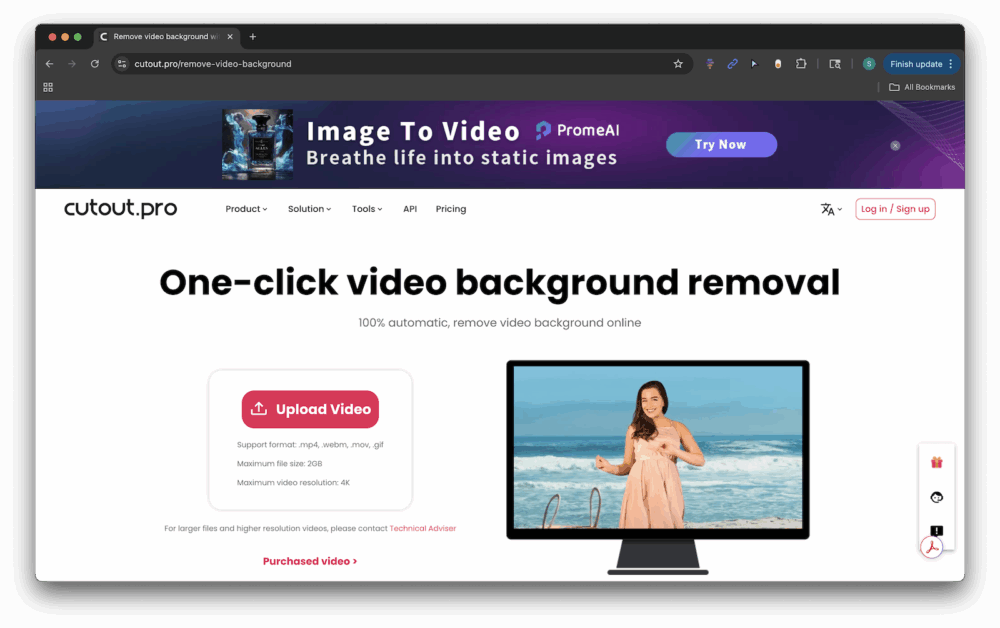
To synthesize, the Video Background Remover uses asynchronous APIs for teams that need to isolate subjects without green screens and perform background deletion at scale, web workflows for casual users.
Also, via AI video enhancers, users can automatically sharpen footage, reduce high-end resolutions up to 4K, reduce noise, stabilize unstable clips, reduce motion artifacts, apply interlacing and motion interpolation, improve contrast and color. The best part? All of these features can be accessed through your browser or your desktop app.
Important features
Generate from AI Image to Video: Prompt Video Background to Single Image, Storyboard, or Animated Clip: Fully Automated Subject Separation, Manual Masking Needs AI Video Enhancer: Automatic Upscaling (up to 4K), Reducing Noise/Artifacts, Motion Stabilization, Interpolation, Motion, Worship Batch Workflow and Production Integration
Pricing
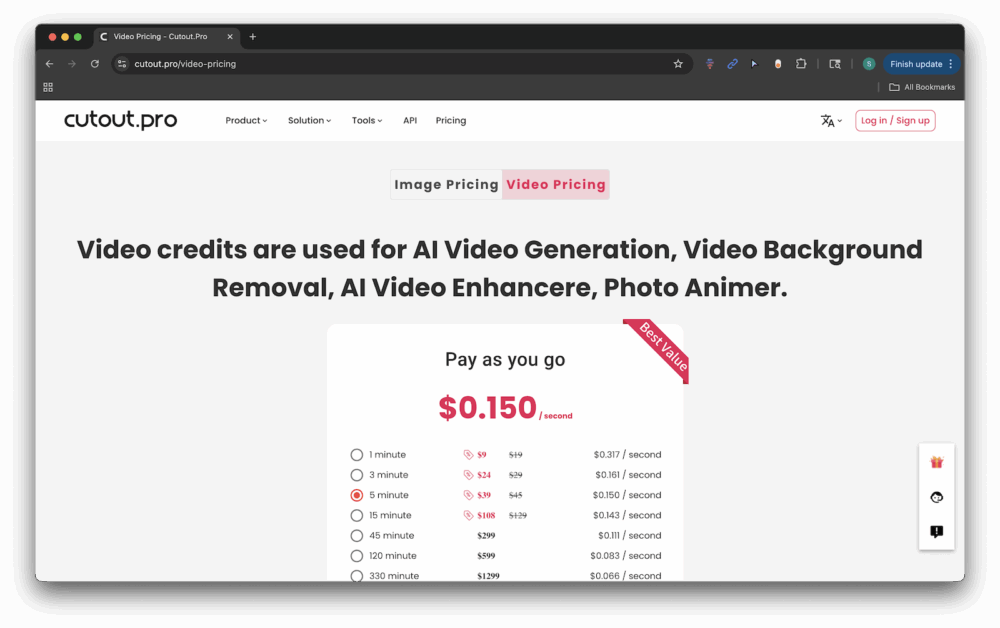
You can register for cutout.pro using your Google or Facebook account. You can then log in and purchase pay-as-you-go credits.
Tensorpix: 4K upscaling in the cloud

Who is it for?
Another player in the Upscaling Arena is Tensorpix, focusing on cloud-based high-resolution enhancements. This makes it particularly appealing to professional users who want to bring new life to content from the VHS era and early digital footage. Batch processing and API integration also provide a powerful option for enterprise teams looking to expand their workflow.
What it does
If many AI tools stop with an extension of basic resolution, Tensorpix pushes into a special area with an advanced cloud-based upscaling engine. A deep learning engine with over 200 million parameters can increase to 4K at up to 60fps, but reduce noise and add motion interpolation.
What sets it apart is Ultra 4 Engine, a deep learning model trained with hundreds of millions of parameters to reconstruct the fine details rather than stretching pixels. The result is sharper edges, cleaner textures, and footage that feels truly remastered rather than artificially expanding.
Tensorpix also includes Deep Clean 4 filtering. This will actively reduce noise and compression artifacts that often plague old or heavily compressed videos. Combined with motion interpolation, frame transitions can be smoothed for more natural movement. This is especially useful when dealing with unstable archived footage and low frame rate clips.
Tensorpics supports batch processing and API integration beyond individual creators, making it a viable solution for producers, archivists, or businesses that need to process videos at scale.
Important features
SD/HD footage upscale to 4K at up to 60fps uses a deep learning engine for sharp detail reconstruction.
Pricing
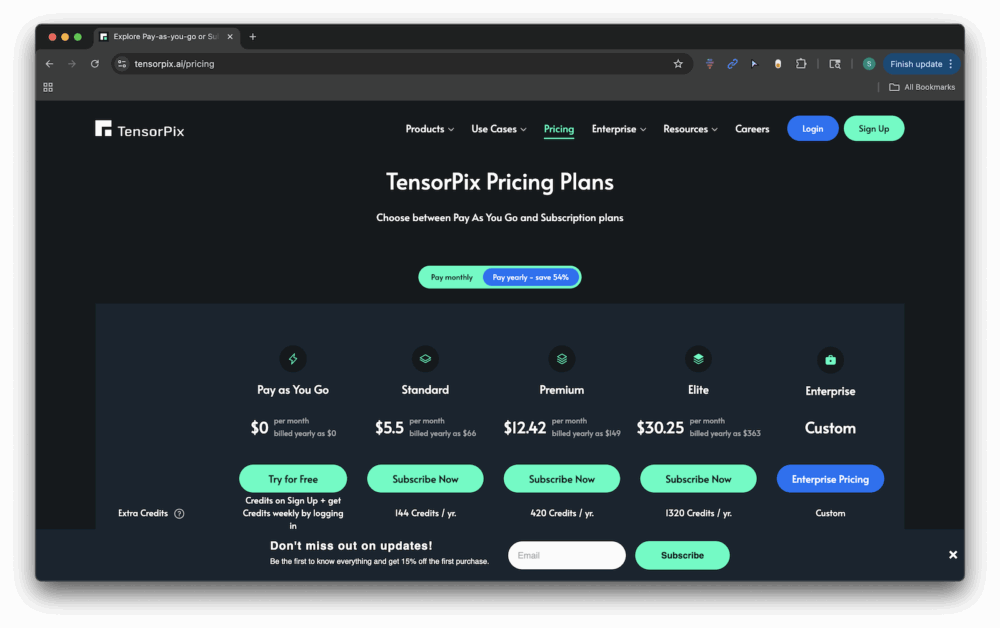
Tensorpix offers a variety of pricing plans to cater to a wide range of users.
Choose the right tool for 2025
The best AI video editing tools depend on your needs. Canva Pro is perfect for those who are already building social campaigns in their ecosystem. If you want a quick background removal, the screen works well. cutout.pro and tensorpix are excellent in video upscaling, especially for archived or mobile shot content.
For creators and businesses who balance speed, flexibility and professional output, vmake.ai stands out as one of the most powerful all-rounders on the market. Combining the strengths of background removal and upscaling into one platform, it helps creators create high-quality content without the steep learning curve of traditional editing software.
Final thoughts
AI is no longer a bystander of video editing. It’s now at the heart of how creators work in 2025. Whether you’re a photographer expanding to video, a social media marketer, or a business owner looking to increase the presence of your brand, these tools can dramatically reduce the time and cost of producing professional content. As the ecosystem continues to evolve, the key is to find the right tools for your workflow. For many, it means professional solutions such as Canva Pro, Unscreen, Tensorpix and more. But for those who want a multipurpose, easy-to-use editor that covers multiple bases, vmake.ai is quickly becoming an option.

