




Business knowledge lives in Microsoft SharePoint. The explosion of AI-powered capabilities, assistants, and agents is creating new possibilities for managing and presenting that knowledge to employees.
The company’s IT organization, Microsoft Digital, is using the latest AI-enabled features in SharePoint to provide more flexible, branded, and fun experiences for employees and to make the jobs of SharePoint page authors easier.
A modern vision for AI-powered corporate knowledge sharing
Since the widespread emergence and adoption of generative AI, new ways to approach daily work have emerged across the Microsoft 365 ecosystem. SharePoint is no exception, with AI-powered features already enabling innovative enterprise content sharing experiences.
Talk to our experts.
If you are a Fortune 500 company or a representative of your Microsoft account team, you can request a virtual engagement with an expert from the Microsoft digital team on this topic.
It’s all part of our vision for modern SharePoint.
“We’re invested in making SharePoint the best place to publish stories and pages, and the fastest way to build engaging content,” said Sam Crewdson, principal program manager at Microsoft Digital. “New AI capabilities will further enable us to achieve these goals.”
The goal is to provide simplicity, speed, and savings for site owners and page creators, while enhancing employee engagement and discovery.
“SharePoint is the number one source of trusted content within the enterprise, which is critical to getting trusted, attributable, and verifiable answers from Copilot and agents,” said Kripal Kavi, lead GPM for SharePoint and OneDrive. “We’re investing in using AI to make it easier than ever to create this authoritative content that’s also suitable for human consumption. Our goal is to reduce the tedium and effort of creating great, high-value content on SharePoint.”
AI-powered SharePoint features in action
SharePoint’s latest AI-powered enhancements provide advanced site management and page authoring opportunities. It provides intelligent support to maintain organizational knowledge, automate workflows, and build engaging pages. As a result, site owners, content managers, and content authors can deliver more dynamic experiences while offloading manual tasks to agents and AI capabilities.
Knowledge Agent for SharePoint
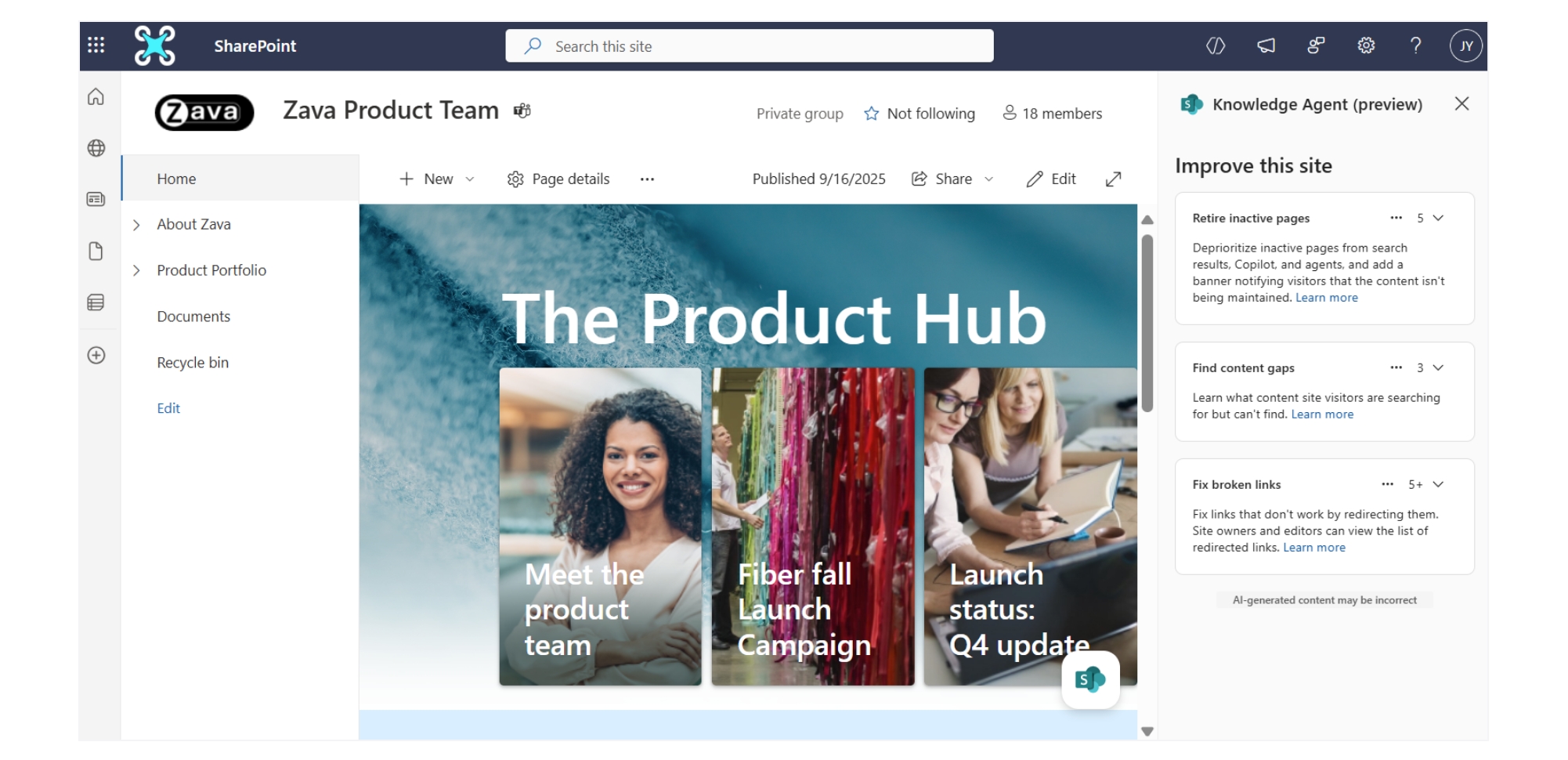
Knowledge Agent is currently available in public preview and streamlines content management and enhances the functionality of Copilot. These new features will appear as permanent floating buttons, ensuring they’re always on top and accessible from one place.
Knowledge Agent blends curated organizational knowledge with advanced AI to achieve three goals:
Improve AI answers: Knowledge Agent gives AI the context it needs with intelligent tagging, classification, metadata automation, and inference. It also helps maintain metadata health and policy alignment through smart suggestions, labeling, and administrative controls. Driving business processes: Agents suggest fields to autofill based on content and user input, create AI-generated views based on metadata, and enable search and workflows with natural language queries. Keep your content fresh: This tool analyzes search behavior to detect content gaps and unmet user needs, and makes recommendations to fix broken links and retire inactive pages across your site. It also accelerates content creation for the web through natural language prompts, templates, and intelligent suggestions.
Content curation with Knowledge Agent
Jon Norris is a Senior Product Manager responsible for the TechWeb Hub. TechWeb Hub is our internal resource for technical support and the primary way people access our helpdesk organization. For him, the benefits of Knowledge Agent start with removing manual work from existing processes.
He incorporates Knowledge Agent into his routine maintenance workflow. For example, he currently uses this tool to scan his site every six months to identify sites and pages that need to be retired or updated.
“As a Microsoft site owner, you can now do almost everything you need to do when it comes to content health without any third-party tools,” says Norris. “Of course, we have always implemented workflows to ensure the health of our sites, but the agent brings all of these key capabilities together in one place and adds AI assistance to the equation.”
Create a page from a meeting
Anyone who has ever tried to coordinate a project after a team meeting understands the challenges of taking notes, gathering resources, and sending follow-up communications. The ability to create SharePoint pages from Microsoft Teams meetings can help you understand next steps and takeaways.
This feature follows a similar process to creating a SharePoint page from a file. When meeting recording and transcripts are enabled, users can access the Create Page from AI feature in SharePoint and select the meeting as the content source. The tool then reviews the transcript and generates a news page based on the meeting.

“Having a record of important points and next steps in a central, durable place where you can direct new and existing team members is invaluable. This not only serves as a record of decisions made, but also serves as a great tool for onboarding new team members.”
Kripal Kavi, Principal GPM, OneDrive and SharePoint
This feature uses materials related to the meeting as context, such as links to content shared during the meeting itself. Page owners can also instruct the tool to include material from other sources and expand the page as their team’s needs change.
Finally, this feature is integrated with SharePoint News, so page authors can publish these resources through email, Teams channels, Viva Amplify posts, and any vector that engages with colleagues.
“Having a record of key points and next steps in a central, durable place where you can direct new and existing team members is invaluable,” says Kavi. “This serves as a record of decisions made as well as a great tool for onboarding new team members.”
Different personas will find different aspects of Knowledge Agent useful. For example, site administrators are primarily interested in older content, but content managers are often overburdened with creating AI-enabled metadata. And content creators are always looking for inspiration amid tight schedules.
Wrapping a layer of agent support around these backend SharePoint tasks makes it easier to tackle different scenarios and ultimately produces better outcomes for content consumers.
Section utilizing AI
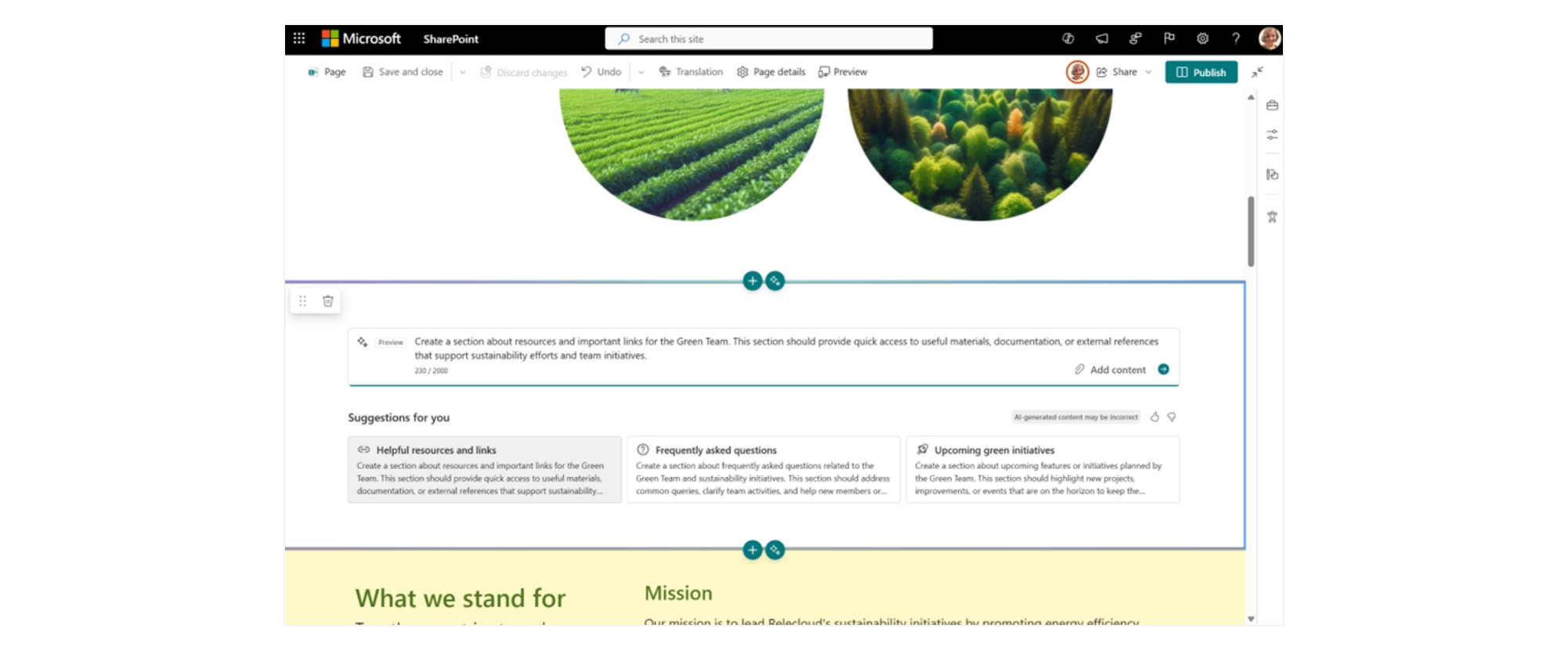
Sections with AI is a new SharePoint authoring tool that allows users to create full-fidelity SharePoint sections with just a prompt. Examines the page context and provides recommended prompts to display the content that the page author wants.
From there, you can create your own sections and organize them into related files to give the AI more context. When an author clicks Generate, Sections with AI uses these sources, the knowledge and materials that already exist within your organization, and the content that’s already on the page to create a rich section. Create content with sections using AI
Create content with sections using AI
Within Microsoft, Norris has seen program managers and other professionals in roles not explicitly based in communications who use this feature extensively. Their expertise doesn’t necessarily lie in creating beautiful sites or effective text, so AI provides a much-needed boost.
And for communications managers, this is a way to accelerate and complement their work.
“Creating pages is great, but the vast majority of users spend their time updating and curating content,” says Norris. “Not only does this feature help you create pages, but it also improves existing content and makes it easier to update.”
AI-powered sections generate recommendations and prompts for users and consider broader content, making them grounded and context-aware. As a result, creating a site using this tool means collaborative iteration with an AI helper.

“This allows program managers to spend more time creating the kind of content they want to work on and that their users want to consume. It’s having a huge impact across the board.”
Jon Norris, Senior Product Manager, Microsoft Digital
This is a step towards the future of agents in enterprise knowledge management and sharing services.
The impact is that it eases the burden on program managers who own SharePoint sites, allowing them to focus on more important things.
“This allows program managers to spend more time creating the kind of content they want to engage with and that their users want to consume,” says Norris. “It’s having a huge impact across the board.”
Drive better experiences and greater engagement
SharePoint site owners and page authors are already experiencing the benefits of a more modern, AI-enabled experience. Within Microsoft Digital, we’re already sharing that we’re saving money and time, and creating more engaging sites.
There’s also a bigger picture than any individual AI-powered feature. Part of modernizing SharePoint includes making knowledge and content accessible not just through the pages themselves, but across the Microsoft 365 ecosystem, particularly by publishing them to Microsoft Teams.
“By making SharePoint pages a first-class experience in Teams, site owners no longer have to force users to load a web page,” says Crewdson. “Instead, you can reach out to colleagues without interrupting your work flow.”
“Initial feedback from internal and external customers is very exciting. Our users clearly see the value of how these features help reduce the painful manual labor required today while maintaining human control over the final output and decision-making.”
Kripal Kavi, Principal GPM, OneDrive and SharePoint
These AI-driven innovations are transforming SharePoint, enabling organizations to manage and share knowledge more efficiently and effectively than ever before. At Microsoft Digital, we’re already experiencing the benefits. As SharePoint’s AI-powered capabilities continue to evolve, employees and site owners alike can expect an even more engaging, productive, and streamlined experience across Microsoft 365.
“The initial feedback from internal and external customers has been very exciting,” says Kavi. “Our users clearly see the value in how these features help reduce the painful manual labor required today while maintaining human control over the final output and decisions.

Important points
Start using SharePoint’s AI-driven features effectively by trying these tips based on our experience at Microsoft Digital.
Rethink knowledge management: Discover how AI agents leverage your organization’s knowledge as context to deliver engaging experiences using sources ranging from legacy content to yesterday’s team meeting. Facilitate peer-to-peer support: Empower site owners to build a consistent community of practice through tools like Microsoft Viva Engage and Microsoft Teams channels. Encourage experimentation: Deliver these capabilities to SharePoint site owners and page authors and provide a collaborative change management effort so they can gain experience and realize the impact. Consider your users: Think about the business people and scenarios where these features will be most useful and highlight them in your change management efforts.

give it a try
Want to try out the AI-powered features of SharePoint? Start your free trial of Microsoft 365.

Related links

We would love to hear your thoughts.

